elfs: (Default)
An "anchor activity" is an activity that underpins your notion of self-control: when you engage in that activity, you develop more self-control in other parts of your life without even trying. The classic anchor activity is exercise: some people, not all clearly, who take up exercise and stick with it suddenly start to eat better. They avoid the whole "I worked out so now I can have cake" thing and instead start ordering smarter foods.

Well, of course: those people who started exercising and stick with it also want their bodies to be well-fueled for the next time. While that may seem obvious, those same people also start spending less money, they become more productive at work or school, finishing assignments on time, and they also become noticeably better at socializing and parenting.

Somewhere in everyone's repertoire is that one activity that, if they were able to engage in it full-time, would ultimately make them better human beings all around. Bicycling seems to be mine; now that bicycling weather is upon us, I'm riding and I find I'm taking better care of myself. I rode to work yesterday, and today I woke up full of good ideas about how to finish a story and a programming assignment and I put my back into helping Omaha and Raen accomplish their goals today, and I'm finding myself enjoying all of it.

So go find your anchor activity. Do it. Make yourself a better person in the process.
elfs: (Default)
So, as I've blogged before, I have recently dealt with both ADHD and dysguesia, and I wanted to see my primary care physician about both. For the first, to make sure she agreed with the treatment and my assessment of it, and for the second, to see if she could do anything more than the urgent care physician I'd seen a few weeks ago.
Do your homework. Make notes about your drugs and supplements, your aches and pains. Don't make them pull it out of your question by question. It'll give you and your doctor much more time to discuss the issue.


She came in and said, "So, what's bugging you today?"

I pulled out my notebook. On the first page I had written down all the medications I was currently taking, the last week's readings of blood pressure, weight, and tallied sleep. On the second page I had a list of all the symptoms related to the dysgeusia, including a timeline of when the symptoms came on, and notes about how the ADHD medications came much later, and so forth. On the third page, I had a list of resources I had consulted, and on the fourth I had a list of questions. She looks over my shoulder, laughs, and says, "I love you guys. You make my job easy."

We talked about the dysgeusia first. I noted that I hadn't been kissing any new, although some of the people I kiss might have been kissing anyone new. She finds my love life as entertaining as everything else.

She looked at one note: "Alcohol: j-curve dose (usually)." "What does that mean?"

I said, "You know the j-curve? The one where one to two drinks actually reduces mortality? That's how much I drink."

She shook her head. "You're gonna live forever." I hope she's right.

By outside clocks, we were running late; the appointment had started later than scheduled. Hilariously, Omaha called to wonder where I was. "You should get that," my doctor said. "I want to talk to her too." They had a brief conversation about her recent hospital stay, and made sure she had an appointment booked soon.

I love my doctor. She's awesome. She gives a damn. And she appreciates not having her time wasted.

She thinks the ADHD treatment is fine, and I'm "taking the meds the way smart people do." She approved of my personal rules about it: skip it some weekends if I'm not doing anything intellectually demanding, skip it any day where I didn't get at least seven hours of sleep. Its job is to make me better, and I'm never going to be better than baseline without enough sleep. Still nothing about the dysgeusia, though. Having ruled out an infection or anatomical damage, we're scheduling blood-metals labwork next week. Joy.

But really, how to see your doctor: make notes before hand. Do your homework. It will give you both much more time to discuss the problem.
elfs: (Default)
Pain doesn't tell you when you ought to stop. Pain is the little voice in your head that tries to hold you back because it knows if you continue, you will change. Don't let it stop you from being who you can be. Exhaustion tells you when you ought to stop. You only reach your limit when you can go no further.
[by Daryl Furuyama, who was a brilliant lifehacker but hasn't been heard from since January. I wonder what happened to him.]
elfs: (Default)

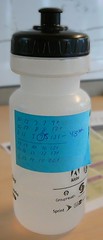
Water bottle
I've been going to the gym fairly regularly again. Today, I seriously hit a wall. It was a good wall, though. I'm up to 43 push-ups and nearly 60 sit-ups. I might yet make that 100 push-up thing. My arms actually look fabulous. My abs, on the other hand, are sad. Not tragically so, but still. I continue to deserve the privilege of the Utilikilt, but I won't if I don't keep my manly physique.

One of the biggest problems I have at the gym is remembering what I'm supposed to be doing right now. I used to bring a 3x5 card with me with all of the exercises on them on the counts and all that. Carrying the card in a pocket, finding a flat surface on which to write, and all of them, became terribly tedious.

This is my lifehack for the week: leave your workout spreadsheet on the laptop. Write down at most a weeks' worth of data on a sticky note and tape that note to the water bottle. It's just a notesheet; you don't care if it lasts more than one workout session anyway. When you're preparing to go to the gym, sit down and write out your day or week's schedule, in whatever idiosyncratic form you want, on the note, then tape it to the bottle.

This works for me because I never forget my water bottle. I don't really need a pen during the session; I can pretty much remember my successes or failures within a single workout. With the numbers right there, I know what I'm supposed to be doing and what sequence I'm supposed to be doing it in. If you have trouble keeping track of your immediate workout demands, this hack might be good for you, too.
elfs: (Default)
Many of you who lifehack on paper, who use a Moleskine or Miquelrius or even a Hipster PDA, know that something is wrong with your method. You might have all the usual skills, adapted post-it tabs and bookdarts and maybe even used an xacto knife to carve out your own sections, but there's still something about your personal to-do system that bothers you a lot.

Admit it: your handwriting sucks.

Do something about it.

Find a hand you like. Seriously, find someone else you want to imitate. If you want to go all out, you can buy Write Now!, which is what I used. You can go to their website and download a few excerpts which show the hand they encourage their students to learn. You can find more excerpts elsewhere, too. You can't improve if you don't have good examples. Heck, maybe you have a favorite font you'd want to imitate. Print out sample sentences in it and practice following them.

Hold your pen loosely in your hand. Hold it as you normally would, but as you're writing once in a while pause and tap your pointer finger against the top of the pen to remind yourself to loosen up. Don't death-grip your pen.

Keep the paper at a comfortable angle, not straight-on. We all know how paper naturally seems to fall at an angle while we're working; figure out what angle works best for you and stay with it.

I spent ten minutes a day every morning for about two weeks, and the improvement was pretty good. I can read my own handwriting now, which is the goal I set out for myself. Some people recommend using lined paper, but I remember something from Drawing on the Right Side of the Brain: writing is just drawing. Words are made up of lines. Get used to doing it on plain paper. I recently switched to a "sketchpad" Moleskine and had a big leap: my handwriting improved, and the lack of lines gave me freedom to explore drawing and digramming. The lines just got in the way.

After that, continue to be mindful of how you write, and never accept illegibility again.
elfs: (Default)
On the one hand, interrupt-driven work processes are the bane of all programmers' existence. It means that you can't go head-down into the code and live with it for a couple of hours because, frankly, work is not going to let you. There are meetings. There are QA people who want answers now. There are inopportune revels in the hallways-- just kidding. But if you work in a cubicle, you know the drill.

Still, there are things that take time, such as builds and checkouts, and those are an excuse to go surf. For me, it's always been a pain to know when a job was done, to keep switching back and forth from, oh, Usenet to the console where I was doing real work, to see if the current task was complete.

Probably the most useful program I've found for doing "interrupts of interrupts" is xmessage, or its Gnome equivalent, gxmessage, which when tacked to the end of some long-running non-daemon process, will pop up a window on your X console when you're done. I use gxmessage, and have an alias called bgxmessage, which looks like this: gxmessage -font "sans 28" -fg white -bg "#446a7e". Gives me a popup with nice colors and big, unmistakeable letters.

Now you know when to go back to work. It's possible to put other things into bgxmessage like timestamps and so forth, if you know your console.


The other tool I use a lot is 'history', which allows you to repeat commands easily. I do this a lot when doing a lot of searching and organizing, and I've aliased my history command down to "h". I recently added another tool: "hg", which looks like this: history | grep. As commands go, it's incomplete, but it has great utility. If you're like me and your history is deep, a thousand entries or more, this allows you to type things like hg Tools, which means "find me every recent command were I referenced something called Tools", which is usually a directory. Or hg rsync, which means "find me every command I've issued recently where I used rsync."
elfs: (Default)
A couple of years ago a phenomenon that would have been more or less impossible before the age of the Internet hit the wires and poor, lonely, desperate geeks sat up, took notice, downloaded the teasers and spent gigabucks on a buzzword-compliant product that promised to change their life forever.

I refer, of course, to Ross Jeffries's Speed Seduction. In 1998, "neuro-linguistic programming," which sounds an awful lot like an attempt to put the Bene Gesserit practices from Dune into real life, was hot. Very hot. NLP seminars and books were hitting the airwaves, people were getting mesmerized in a way that hasn't happened since Mesmer, and Mr. Jeffries was (and is) selling a collection of NLP-buzzword-compliant techniques for getting and keeping a woman's attention. Mostly, it's about pickup lines. Sometimes weird pickup lines.

While I was reading through Ross's literature (at the time, he and his cronies were bombarding the sex newsgroups and forums with spam), I figured out what his customers were buying. And I thought about those purchases today when I read Nick Gillespie's review of SHAM, a book by Steve Salerno about how self-help books are ruining America. The reviewer gives a pass to Franklin, Carnegie, and Hill, but that with "I'm OK, You're OK," an entire generation of doubts and fears has been cultivated for which only the Self-Help Actualization Movement (SHAM) can help.

A buyer of How To Pick Up Girls for $6.95 or Ross Jeffries' Speed Seduction for significantly more are buying courage. An excuse to be brave. "I spent so much time and money studying these techniques-- which I didn't know before-- that I can only justify that expense to myself if I practice them!" is the thought pattern that goes into those purchases.

The same thought process goes into purchases of Organizing from the Inside Out, Eating Well For Better Health or, yes, Getting Things Done. Sometimes the book isn't even read; we know what they're going to say, but now we have purchased a totem towards our desire and we will honor that totem, and the cost we paid.

At least for a little while. Consumerized totems wear out; that's the nature of a consumer economy. Even more, ours is an attention economy, where the great draft of cash is made by holding the attention of others, and these books only hold our attention for a little while. The totem must be renewed, a fresh sacrifice made upon the altar of our intentions, usually committed with green slips of paper.

Salerno worked in the publishing industry and learned to appreciate just how much recycling went on. The same things were said over and over, usually just with different cover art. Salerno blames the self-help industry for creating the anxiety in the first place, but I don't believe that. We were always anxious. We've just really come to believe that happiness, or at least the waysigns to it, can be bought. And when the shine wears off, we buy it again. That's not the self-helper's fault; that's just consumerism.

One of the nicer aspects to Lifehacks is that much of what they teach is free (or cheap, like a pack of 3x5 index cards), but the daily drumbeat of "things you can do to make your life better" does help feed the attention beast. It's a shame that Covey never understood the attention economy and its need for constant repetition as well as others; without that cynical realization, they've lost a lot of marketshare. (Most of the earnest SHAMmers have never really understood the repetition aspect, which is why they fall well behind the Ross Jefferies, Deepak Chopra, and Chicken Soup for the Brain-Eating Zombie Soul crowd.)
elfs: (Default)
I think I've reached a plateau about Getting Things Done, geek-style. I'm happy with the methodology I've hit, and I hope I'm done fiddling with it. I tried everything: Franklin/Covey paper-based planner, Palm-based planner, even a Hipster PDA.

The one thing that's always appealed to me as someone who tries to keep separate many disparate parts of his life (corporate programming drone, husband and father, kinky polyamorist) is the Covey method of defining your "roles." So when I started, I wrote mine out, with things like "Father" and "Husband" and "Homeowner" and so forth. I'm still not sure that's working for me the way I want it to; I think I like the GTD method of going on a project-by-project basis, but I have so many projects going that the roles thing helps me stay on track.

One of the nice things about the Roles feature is that it lets me have a completely separate system for the one thing that shouldn't intrude on my private life: my job. My corporate drone position seems cursed with a gazillion different ways of getting things done: email updates for both calendar and to-do, plus the normal human interaction of dropping things in my chair (or just dropping by), plus the weird expectation from the marketing department that doesn't understand, after five years, why we Unix geeks don't use Outlook and Exchange.

But where to keep all of this? That remains the principle challenge. As I see it, there are four important categories that my "stuff" needs for organization: Projects, Tasks, Calendered Events, and Notes.

And that's when I read Cory Doctorow's speech at Life Hacks Live where he said, "Real programmers use text files."

Boom. Projects go into a text file, laid out in Emacs Outline-Minor-Mode. Eventually, that text file was renamed "FrontPage" (no relation to the execrable Microsoft product) and put under Emacs Wikimode. That allowed me to use StudlyCapsMode to create notes and subprojects. (One reads "AtWork" and opens to a list of work-related projects, which means I can leave that screen open at work and no-one is the wiser to my private life if they happen to glance at it).

Tasks go under each project, one of which is listed as "NA", or "Next Action." Next to some of them there will be parentheses, into which go calendar-related project notes ("DL: Due 3/4", "PD: Won't be back until 7/12"). Those marked "DL" or "Deadline" are only marked for those items that have consequences.

It all really works, for once. For those things that I need to have immediate, or that I need for reminding, I put into my Palm. I may carry my laptop with me most places, but certainly not everywhere, but I can carry my Palm in my pocket. And as a reminder/alarm clock, it's perfect. I also transfer those "to do" items that I'll be doing out on the road, or when I'm away from the network. Since it also has enough memory for five or six novels, it fills in many of the needs I have when on the road.

For notes, I also carry a small notebook. People seem to think that a notebook is more friendly, analogue, and generally useful than the Palm notepad, and I agree. You can't draw, or be clever, with the Palm notepad, and it's certainly slower than pen and ink.

But the combination of Emacs wiki-mode and outline-minor-mode means that very complicated projects don't necessarily clutter up the main page, and if want to see just the projects themselves and not all of the subprojects or subtasks that go with it, I can just tell outline-minor-mode to show only the first two layers, and hide all of the details. And it provides sufficient real estate, in my case, to get a lot of organization done.

Now all I need to figure out is how to easily make my "Next Actions" list in Emacs port to the Palm directly...

Profile

elfs: (Default)
Elf Sternberg

December 2025

S M T W T F S
 12345 6
78910111213
14151617181920
21222324252627
28293031   

Syndicate

RSS Atom

Most Popular Tags

Style Credit

Expand Cut Tags

No cut tags
Page generated Dec. 30th, 2025 02:34 pm
Powered by Dreamwidth Studios